
retroweb:getting_started:netscape_navigator_4.0
Proxy Settings for Netscape Navigator 4.0
- Go to Edit ⇒ Preferences
- Under Advanced, open Proxies
- Select Manual proxy configuration and click on View.
- Under FTP Proxy, Gopher Proxy and HTTP Proxy type in the address
wayback.steptail.com - Under Port type in the port number of your chosen server. Consult the server list and choose a port number.
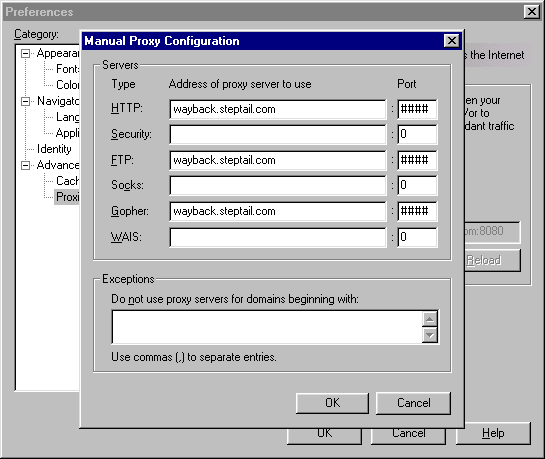
- Hit OK, then OK again to close out of the Preferences window.
- You may begin using the service by navigating to http://welcome.inode.com
retroweb/getting_started/netscape_navigator_4.0.txt · Last modified: by 127.0.0.1